Embedding Forms
Embed your Rowform directly into any website or web application. Choose from three embed layouts, each available in two code formats.
Accessing Embed Options
- Open your form in the Builder.
- Publish it from the builder header if it is not already live.
- Open Share in the top navigation.
- Select Embed in website, then choose a layout (Inline, Full page, or Popup) and a code type (iframe or JavaScript).
Embed Layouts
Inline
A fixed-height embed that fits into your page content. Ideal for embedding forms within blog posts, landing pages, or help articles.
<iframe
  src="https://app.rowform.io/form/YOUR_FORM_ID"
  width="100%"
  height="600"
  frameborder="0"
></iframe>- Default height: 600px. Adjust as needed for your form length.
- The form scrolls within the embed.
Full-Page
An embed that takes up the entire browser viewport. Use this when the form is the main content of the page.
<iframe
  src="https://app.rowform.io/form/YOUR_FORM_ID"
  style="position:fixed;top:0;left:0;width:100%;height:100%;border:none;"
></iframe>
Popup
A button-triggered popup that opens the form in an overlay. Great for feedback buttons, exit-intent surveys, or call-to-action triggers. Includes a close button so respondents can dismiss the overlay.
Code Types
For each layout, you can choose between two code formats:
iframe
A simple HTML <iframe> tag. Easiest to use — just paste the code and it works. Best for most use cases.
JavaScript
A <script> snippet that dynamically creates the embed. Use this when you need more control, or when your platform doesn’t support raw iframes (e.g., some CMS or site builder environments).
How to Embed
- Choose your embed layout from the Share tab.
- Select the code type (iframe or JavaScript).
- Click the Copy button to copy the embed snippet.
- Paste the code into your website’s HTML where you want the form to appear.
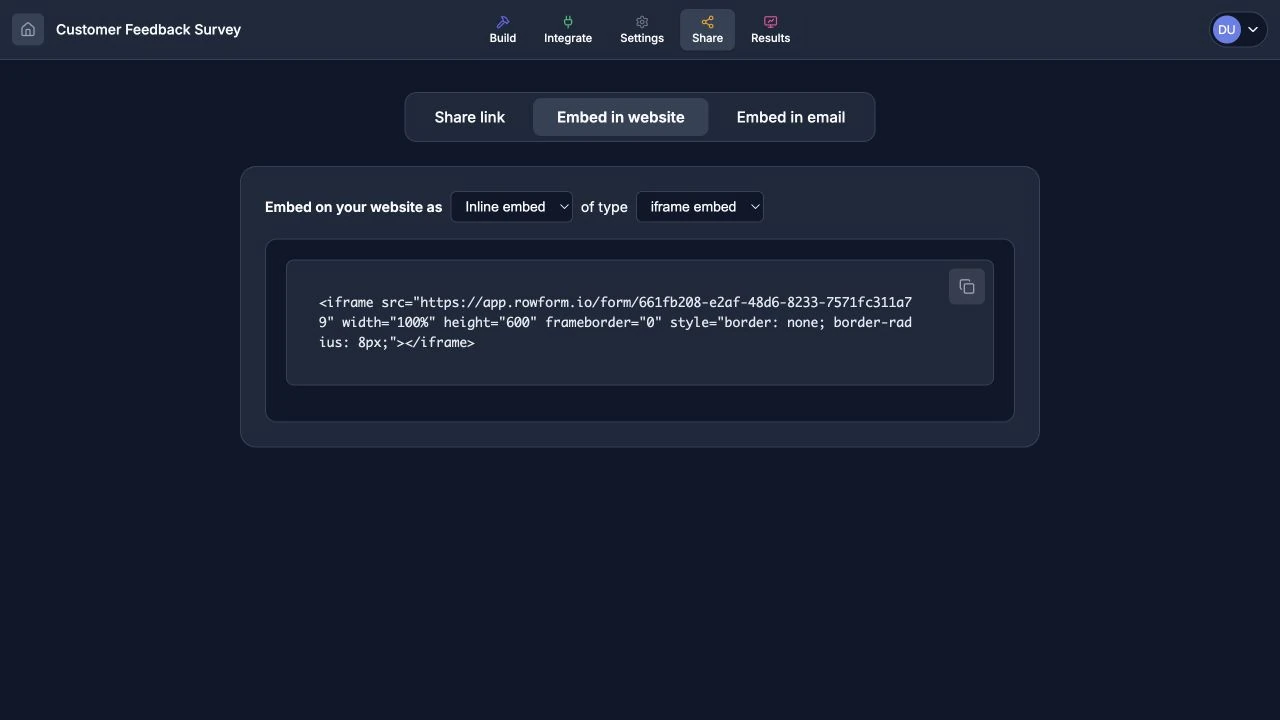
Choose a layout and code type, then copy the generated snippet.
Platform-Specific Instructions
WordPress
- Edit the page or post where you want the form.
- Add a Custom HTML block.
- Paste the embed code.
- Save and preview.
Webflow
- Drag an Embed element onto your page.
- Paste the embed code into the code editor.
- Save and publish.
Squarespace
- Add a Code Block to your page.
- Paste the embed code.
- Save.
HTML Sites
Paste the embed code directly into your HTML file where you want the form to appear.
Email Embed
Embed the first question of your form directly into an email. Recipients can begin responding from their inbox — when they click an option, the full form opens in their browser with the answer pre-filled.
How It Works
- Open your form in the Builder.
- Open Share in the top navigation.
- Select Embed in email.
- Click Copy HTML to copy the email-safe code.
- Paste the HTML into your email marketing tool’s code editor (Mailchimp, SendGrid, Brevo, etc.).
Supported Question Types
The following question types render as interactive options in the email:
- Multiple Choice — each option appears as a clickable button.
- Dropdown — options are listed as clickable buttons.
- Rating — displays 1–5 star buttons.
- Opinion Scale — displays numbered buttons (1–10).
- NPS — displays numbered buttons (0–10).
- Legal — displays an accept button.
For all other question types (text, email, date, etc.), a “Start answering” call-to-action button is shown that links to the full form.
Email Client Compatibility
The generated HTML uses table-based layout with inline styles for maximum compatibility across email clients including Gmail, Outlook, Apple Mail, and Yahoo Mail.
Tips
- Make sure your form is published before copying the email embed code.
- Use the Show preview toggle on the Share page to see how the embed will look.
- The embed always uses your form’s first interactive question — reorder questions in the Builder if needed.
- For the best experience, place the email embed near the top of your email body.
Bot Protection
Embedded forms include the same Cloudflare Turnstile bot protection as directly published forms. Protection runs invisibly inside the embed and requires no additional setup on the host site.
Tips
- Use the inline layout for most cases — it integrates naturally with page content.
- Use the full-page layout for dedicated form pages or landing pages.
- Use the popup layout for forms that shouldn’t interrupt the main page experience.
- Choose the iframe code type for simplicity. Use JavaScript if your platform has restrictions on iframes.
- Make sure the iframe height is tall enough for your form to avoid excessive scrolling.
- Test the embed on mobile — iframe behavior can vary across devices.