Form Settings
Configure how your form behaves, what language it uses, and when it closes. Access these options from the Settings tab in the Builder.
General Settings
Progress Bar
Toggle the progress bar on or off. When enabled, respondents see a visual indicator of how far they are through the form.
Navigation Arrows
Show or hide the forward/back navigation arrows. When hidden, respondents use only the “Next” button to advance.
Refill Link
When enabled, each submission generates a unique refill link that can be used to reopen the form with the respondent’s previous answers pre-filled. This makes it easy to resubmit with minor changes — useful for recurring surveys, order forms, or feedback loops.
Refill links are available in the Results panel: open any submission’s detail view and click the copy refill link button. Refill links also work for partial responses — if a respondent abandoned a form, you can send them a refill link to resume with their previous answers already filled in.
When a respondent submits via a refill link:
- Complete responses are updated in place (the original submission is overwritten with the new answers).
- Partial responses create a new complete submission and the original partial is marked as converted.
This is a Pro plan feature.
Powered by Rowform
A small watermark at the bottom of your form. This can be removed on the Pro plan.
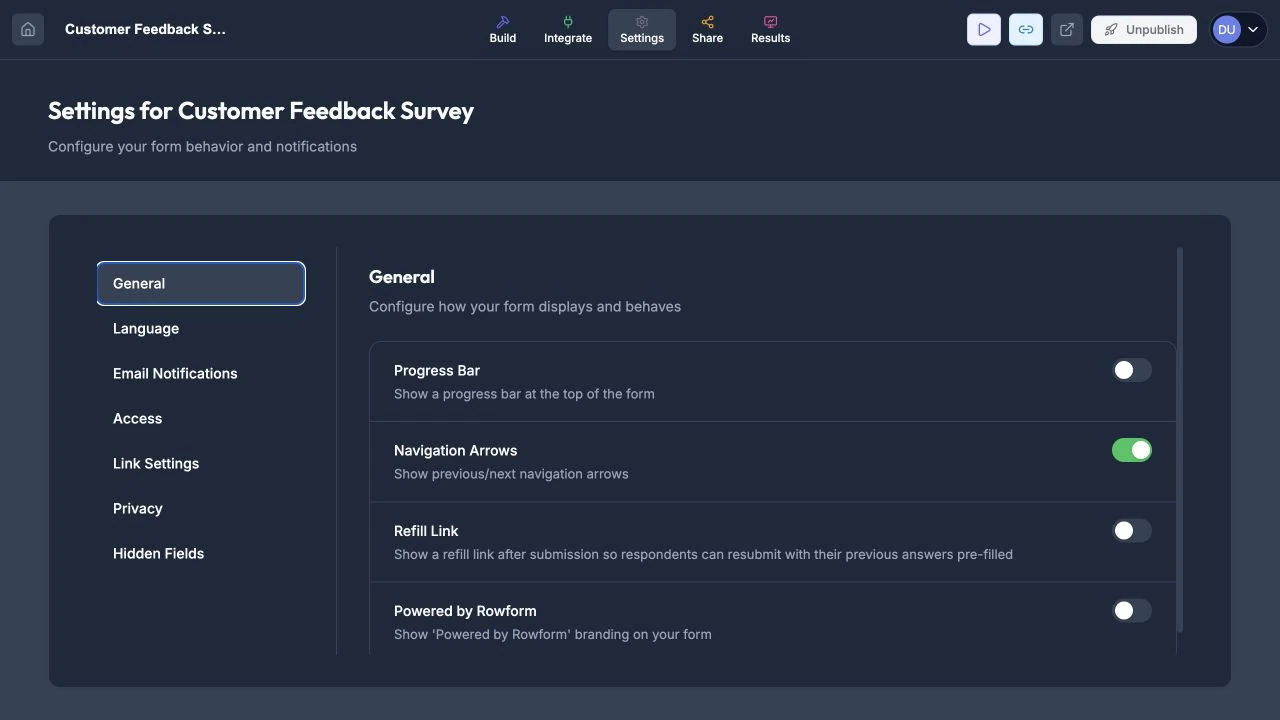
General settings control respondent navigation and form branding.
Bot Protection
Rowform includes built-in bot protection powered by Cloudflare Turnstile . This helps prevent spam and automated submissions on all published forms.
How It Works
- Bot protection runs invisibly in the background — respondents are never interrupted with a CAPTCHA or puzzle.
- Cloudflare silently analyzes browser signals to distinguish real users from bots.
- If a submission is flagged as suspicious, it is blocked before reaching your responses.
- Verification happens server-side, so it cannot be bypassed by disabling JavaScript on the client.
When Bot Protection Applies
- Published forms — All published forms are protected automatically. No setup required.
- Embedded forms — Forms embedded via iframe or JavaScript on external sites are also protected.
- Preview mode — Bot protection is skipped in the Builder preview so you can test freely.
No Configuration Needed
Bot protection is enabled globally and requires no per-form settings. It works out of the box for all forms on your account.
Language Settings (Pro)
Rowform supports 15 languages for the form interface (button labels, validation messages, etc.):
- English
- Spanish
- French
- German
- Italian
- Portuguese
- Dutch
- Polish
- Russian
- Japanese
- Chinese
- Korean
- Arabic
- Hindi
- Turkish
Setting the Default Language
Select your default language from the dropdown. All system text (like “Next”, “Submit”, “Required”) will be displayed in that language.
AI Translate (Pro)
Translate your entire form into another language using AI. The following content is translated:
- Form title and description
- Question labels, descriptions, and answer options
- Placeholder text on input fields (Short Text, Long Text, Email, Phone, Number, Website, Dropdown)
- Button text on each question (OK, Submit, Start, Continue, etc.)
- Contact Info field labels (First Name, Last Name, Email, etc.) and placeholders
- Address block field placeholders (Street Address, City, State/Province, etc.)
- Matrix row and column headers
- Legal block accept labels
- Open your form in the Builder.
- Click the Translate icon (globe) in the top toolbar.
- Select a target language from the dropdown.
- Click Translate with AI. The translation takes a few seconds.
- Preview the side-by-side comparison of original vs translated text.
- Click Apply Translation to save.
Managing existing translations:
- All saved translations appear in the “Existing Translations” list at the top of the Translate modal.
- Click the eye icon to view a translation, then Apply Translation to re-apply it.
- Click the trash icon to remove a translation.
- To overwrite an existing translation, select the same language and click Translate with AI again.
Multi-Language Forms
Translations are applied automatically when respondents open your published form:
- If the URL contains
?lang=es(or any language code), that translation is used. - Otherwise, the respondent’s browser language is auto-detected.
- If no matching translation exists, the form falls back to the default language.
Your original form content is never modified — translations are stored as a separate layer and applied at render time.
Text Direction (RTL Support)
Rowform automatically detects right-to-left (RTL) text and adjusts the form layout accordingly. RTL languages include Arabic, Hebrew, Persian, and Urdu.
When RTL is active, text alignment, input fields, navigation controls, and button icons are all mirrored to read naturally from right to left.
How it works:
- Auto-detect (recommended) — Rowform detects RTL in two ways: first by checking the form’s language setting, and then by scanning your question text for RTL characters. This means even if your form language is set to English, typing Arabic or Hebrew text in your questions will automatically switch the form to RTL.
- Left-to-Right (LTR) — Forces LTR layout regardless of language or text content.
- Right-to-Left (RTL) — Forces RTL layout regardless of language or text content.
To change the text direction, go to Settings → Language → Text Direction and select your preferred option.
For multi-language forms, RTL is applied dynamically based on the respondent’s active language. For example, a form translated into both English and Arabic will display LTR for English visitors and RTL for Arabic visitors.
System Messages
Customize the default text that respondents see throughout your form — buttons, hints, error messages, and more. This is found below the language settings in the Language tab.
System messages are organized into five categories:
- Buttons, hints, and shortcuts — OK/Submit buttons, keyboard hints, Yes/No labels, selection instructions, and other interactive text.
- Error messages — Validation messages for required fields, invalid emails, URLs, phone numbers, number ranges, and dropdown mismatches.
- Loading & completing a form — The confirmation message after submission, and error messages for server/connection issues.
- Other — Unsupported device alerts and line break hints.
- File upload — Upload prompts, drag-and-drop hints, file size errors, and upload progress messages.
Each field shows the default value and a character limit. To customize a message, simply edit the text in its input field. Customized fields are highlighted with a blue border.
To revert a single field, click the reset icon next to it. To reset all fields in a category, click the Reset all button in that category’s header.
Link Settings
Customize how your form appears when its link is shared on social media or messaging apps.
Title
Set a custom title for link previews (Open Graph). If left empty, your form’s title is used by default.
Description
Set a custom description for link previews. If left empty, your form’s description is used by default.
Social Preview Image (Pro)
Upload a custom image that appears when your form link is shared on social media (Facebook, Twitter/X, LinkedIn, Slack, etc.). Recommended size: 1200 × 630px. Supported formats: PNG, JPEG, WebP.
If no custom image is set, Rowform falls back to your form’s logo, background image, or the default Rowform preview image.
Favicon (Pro)
Upload a custom favicon — the small icon shown in the browser tab when respondents view your form. Recommended size: 32 × 32px or 64 × 64px. Supported formats: PNG, ICO, SVG.
Note: Link Settings also apply when your form is accessed via a custom domain. Social media previews on custom domain URLs use the same title, description, image, and favicon configured here.
Hidden Fields (Pro)
Hidden fields let you silently capture URL parameters — like UTM tags, referral codes, or partner IDs — with each form submission. They’re invisible to respondents and useful for attribution, campaign tracking, and CRM routing.
Setting Up Hidden Fields
- Open your form in the Builder.
- Go to the Settings tab.
- Click Hidden Fields in the sidebar.
- Select a suggested field from the dropdown (e.g.,
utm_source,utm_medium,ref) or type a custom field name and press Enter. - Click Save.
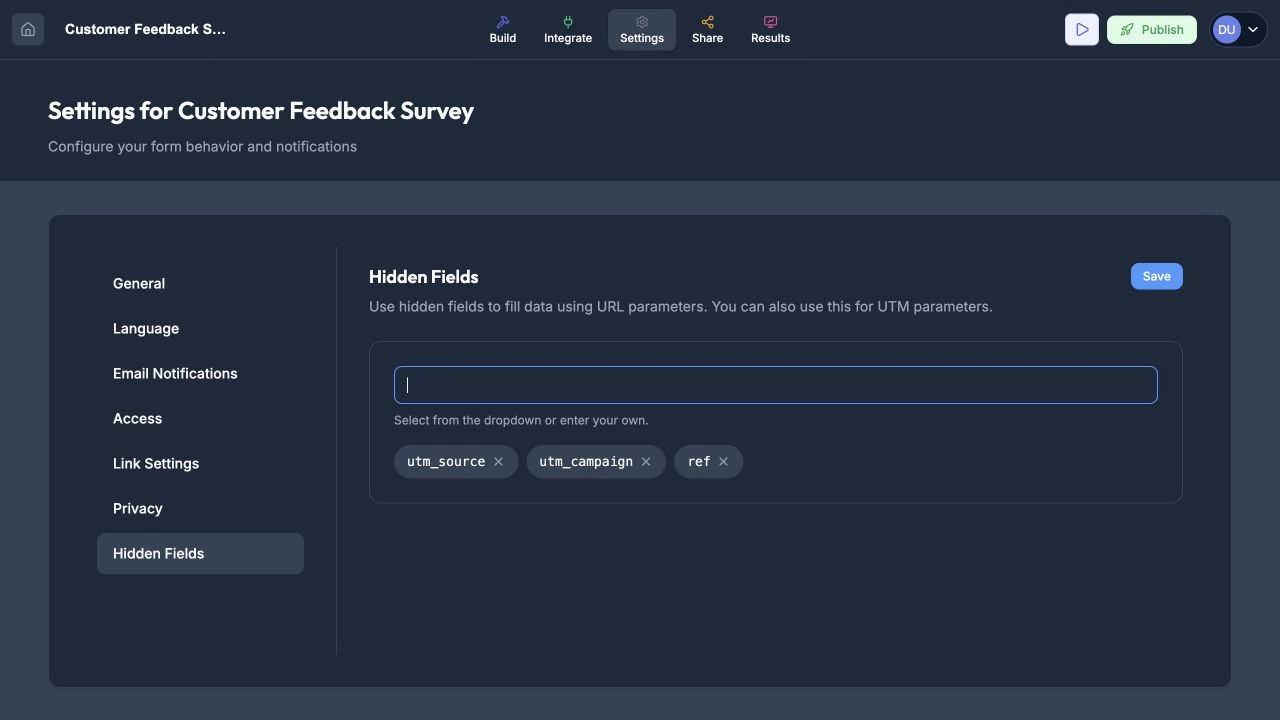
Add URL parameters to capture attribution data without displaying another question.
Each hidden field corresponds to a URL parameter. For example, if you add utm_source and ref, share your form link as:
https://app.rowform.io/f/your-form-id?utm_source=google&ref=partnerWhen a respondent opens that link and submits the form, the values google and ref=partner are captured automatically alongside their answers.
Suggested Fields
Rowform suggests commonly used parameter names:
utm_source— Traffic source (e.g., google, newsletter)utm_medium— Marketing medium (e.g., cpc, email)utm_campaign— Campaign nameutm_term— Paid search keywordutm_content— Ad content variantref— Referral identifiersource— Generic sourcecampaign— Generic campaignchannel— Marketing channelpartner_id— Partner or affiliate ID
You can also type any custom parameter name.
Where Hidden Field Data Appears
- Results tab — Hidden fields appear as additional columns after your question columns.
- CSV export — Included automatically as extra columns.
- Google Sheets — Appended as additional columns after question data.
- Email notifications — Listed after question answers in the notification email.
- Slack notifications — Included in the submission message.
- Webhooks / API — Included in the
raw_answersobject withhf_prefixed keys.
Default Values
If a URL parameter is missing when a respondent opens the form, the field is left empty. Hidden fields only capture values that are present in the URL.
Form Closing Rules
Control when your form stops accepting responses:
Close Manually
Toggle the form to closed status at any time. Closed forms display a “This form is no longer accepting responses” message.
Close by Date
Set a specific date and time when the form will automatically close. Useful for time-limited surveys, event registrations, or application deadlines.
Close After Submission Limit
Set a maximum number of responses. Once the limit is reached, the form closes automatically. Useful for contests, limited-capacity events, or research studies.
Auto-Refresh on Inactivity
When enabled, the form automatically refreshes if a respondent is inactive for an extended period. This helps ensure data integrity for forms displayed on shared devices or kiosks.
Privacy Notice
Add a custom privacy notice to your form so respondents know how their data is handled. This is especially useful for GDPR compliance when collecting personal information.
Enabling the Privacy Notice
- Go to Settings > Privacy in the Builder.
- Toggle Privacy Notice on.
- Enter your notice text (e.g. “We process your data in accordance with our Privacy Policy.”).
- Optionally add a Privacy Policy URL — if set, the notice text becomes a clickable link that opens in a new tab.
The privacy notice appears in the bottom-left corner of your form, visible on every question. It is styled as a small, subtle badge so it doesn’t distract from the form experience.
Note: The privacy notice is off by default. Rowform provides this as a tool for form creators — the notice text and link are entirely up to you.
Tips
- Use the progress bar for longer forms (5+ questions) so respondents know how much is left.
- Set a closing date for time-sensitive forms to avoid late submissions.
- Choose the language that matches your target audience. You can always change it later.