Templates & AI Form Generator
Skip the blank page. Start with a pre-built template or ask AI to draft a form that you review before it is created.
Using Templates
Browsing Templates
- Click New Form on your dashboard.
- Under Or start another way, click Pick a template.
- Search by keyword or choose an industry from All categories.
- On a template card, choose Preview to inspect it or Use it to create the form immediately.
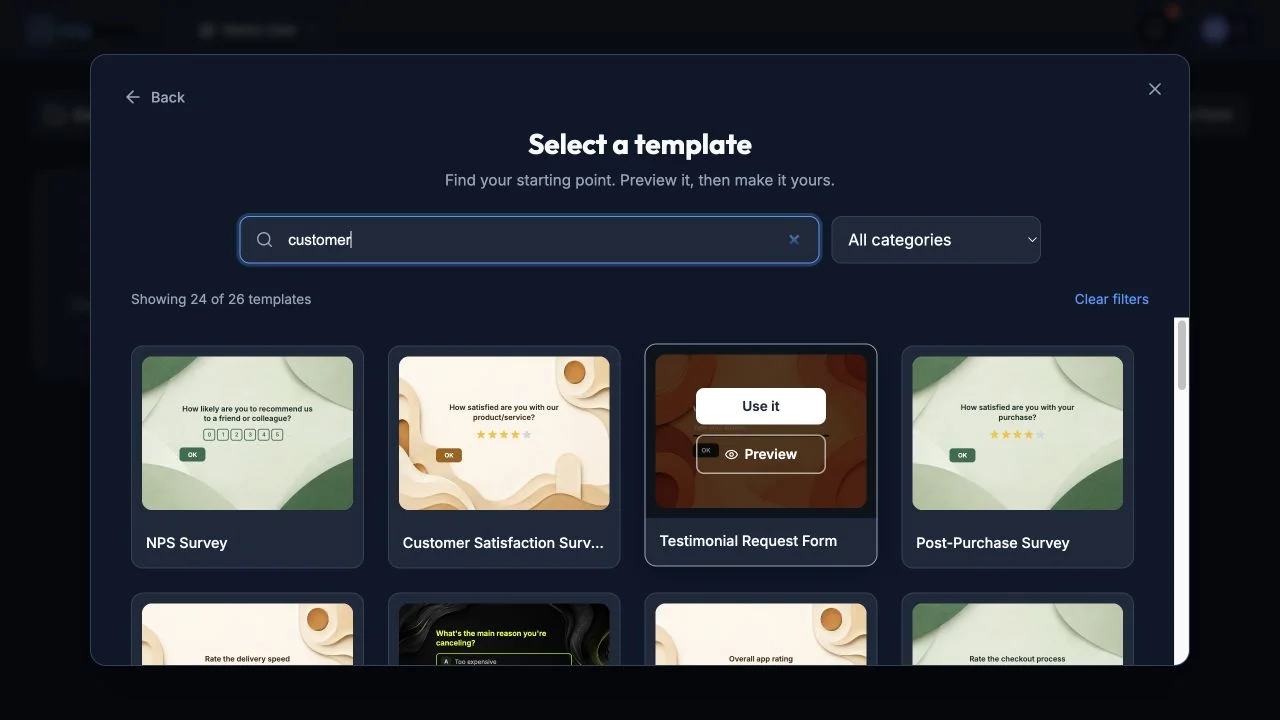
Search or filter the template library, then preview or use a result.
Finding the Right Template
Use All categories to filter templates by industry:
Industry categories: Business, Marketing, HR, Finance, Consulting, Legal, Real Estate, SaaS, Software, E-commerce, Healthcare, Education, Hospitality, Fitness, Travel, Entertainment, Beauty, Nonprofit, Events, Agency, Media, and more.
Useful form-type searches include:
- Survey
- Feedback
- Registration
- Application
- Quiz
- Order Form
- Contact Form
- Poll
- Assessment
- Intake Form
The Search templates… field matches template titles, descriptions, industries, and form types. Try keywords such as “customer satisfaction”, “event registration”, or “employee feedback”.
Using a Template
- Choose Preview on a template card to inspect the complete form.
- Use the desktop and mobile buttons to check both preview sizes.
- Click Use this template to create the form from the preview.
- To skip the preview, choose Use it directly on the template card.
- Rowform copies the template into your workspace and opens it in the Builder.
- Customize its questions, design, logic, and settings as needed.
Templates include pre-configured:
- Questions and answer options.
- Design theme and colors.
- Form settings.
AI Form Generator
When you click New Form, the AI creator is the primary starting point. It generates a proposal first; no form is added to your workspace until you accept that proposal.
How to Use It
- Click New Form on your dashboard.
- Describe the form you want in the text box, using up to 2,000 characters.
- Optionally choose one of the examples to populate the prompt.
- Open More options to set a Number of questions from 3 to 30 or a Target audience. Leave the question count on Auto to let AI decide.
- Click Generate form.
- Review the proposed title, description, blocks, answer options, and logic.
- Choose Reject to return to your prompt and revise it, or Accept and create form to save the proposal.
- After you accept it, Rowform creates the form and opens it in the Builder for further editing.
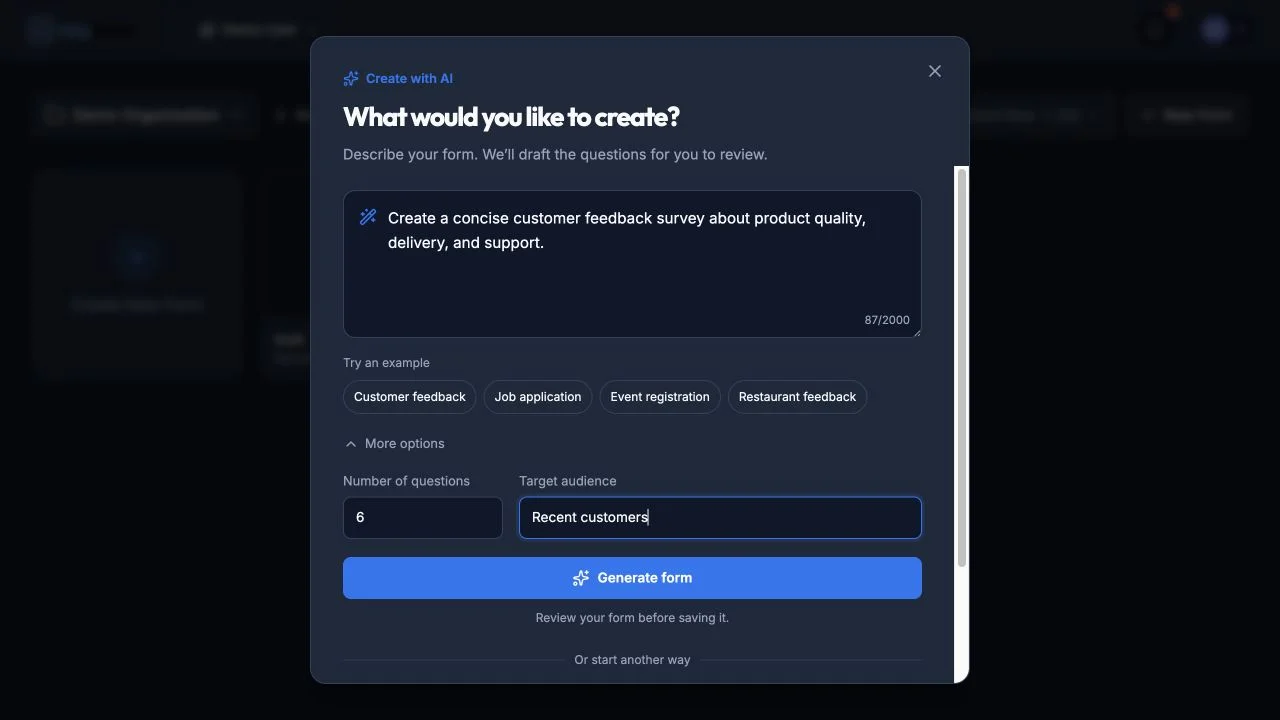
Describe the form, optionally guide its length and audience, then generate a proposal to review.
Example Prompts
- “Create a customer satisfaction survey for a SaaS product with questions about onboarding, features, and support.”
- “Build an event registration form that collects name, email, dietary preferences, and t-shirt size.”
- “Make a job application form for a marketing manager position.”
- “Design a patient intake form for a dental clinic.”
- “Create a course feedback form for a university class.”
- “Build a restaurant feedback form with ratings for food, service, and ambiance.”
- “Make a product return request form.”
- “Create a volunteer signup form for a nonprofit.”
RTL Language Support
When you generate a form in an RTL language (Arabic, Hebrew, Persian, or Urdu), the AI form generator automatically:
- Sets text direction to RTL on the form.
- Right-aligns all question text (except the Thank You page, which stays centered).
- Translates system messages (button labels like “OK”, “Start”, “Submit”, error messages, and placeholder text) into the detected language.
This means a form generated in Arabic will have fully Arabic buttons, hints, and error messages out of the box — no manual configuration needed.
Tips for Better AI Results
- Be specific about the topic and purpose of the form.
- Open More options and use Target audience to specify who the form is for — the AI will adjust the tone and question topics accordingly.
- Open More options and set Number of questions when you need a specific count, or leave it on Auto.
- Mention specific question types you want in the prompt (e.g., “include a rating scale” or “add a file upload for resumes”).
- For RTL languages, write your prompt in the target language or specify the language (e.g., “create a customer feedback form in Arabic”).
- Review the proposal carefully. Choose Reject to revise the prompt or Accept and create form when it is ready.
- AI proposal generation is limited to 10 requests per hour. If you hit the limit, wait a few minutes and try again.
AI Chat Builder (BETA)
The AI Chat Builder lets you create and modify forms through a conversational interface, directly inside the form builder.
How to Access It
- Open any form in the builder.
- Use the AI composer along the bottom of the canvas.
- Describe the change you want, then send the request.
What You Can Do
- Generate a form from scratch — describe the form you need and the AI will create all the questions for you.
- Add questions — ask the AI to add specific question types or topics to your existing form.
- Remove questions — tell the AI to remove questions by name or topic.
- Modify questions — ask the AI to update labels, descriptions, options, or settings on existing questions.
- Reorder questions — request the AI to rearrange your form’s question order.
- Update the form title — ask the AI to rename your form.
Using the Chat
- Type your request in the text box at the bottom.
- Press Enter to send (Shift+Enter for a new line).
- The AI responds with a message and automatically applies changes to your form.
- After each response, suggestion chips appear with follow-up actions you can click.
- A badge shows how many changes were applied (e.g., “Applied 3 change(s)”).
Example Prompts
- “Create a product waitlist form with name, email, and company size”
- “Add a rating question asking about overall satisfaction”
- “Remove the phone number question”
- “Make the email question required”
- “Reorder the questions so demographics come first”
- “Rename this form to ‘Q1 Customer Feedback‘“
Tips for Better Results
- Be specific about what you want to add or change.
- Reference existing questions by name when asking for modifications.
- Use the suggestion chips for quick follow-up actions.
- Click Clear to start a fresh conversation.
- The AI can see your current form, so you can say things like “add a question after the email one” or “remove the last question”.
Limits
- AI Chat Builder is limited to 30 messages per hour.
- Available to all users on every plan.
Tips
- Start with a template even if it’s not a perfect match — it’s faster to edit an existing form than to build from scratch.
- Use the AI generator for unique or niche forms where templates don’t exist.
- Use the AI Chat Builder to iteratively refine a form — generate a starting point, then use the chat to add, remove, or tweak questions.
- Combine both: generate with AI, then compare with a similar template to see if you missed any important questions.